Wednesday, 25 July 2012

Samsung Galaxy Beam review


The first attempts at a projector phone didn't quite work out for Samsung. For many that would be enough to call it a day, but not the Koreans. You don't become the world's number 1 phone manufacturer by giving up easily, so Samsung chose to take a step back, learn from mistakes and give it another go.
The Samsung I8530 Galaxy Beam takes a completely different approach to making a projector phone and a smartphone work together. Last time around, with the original Beam, Samsung took a high-end device and slapped a rather advanced projector on its back, effectively ending up with something very thick and expensive, which was nearly impossible to sell. Thicker devices lack the high-end vibe one normally associates with smartphones in that price range, so it never really managed to get going.
Samsung Galaxy Beam Samsung Galaxy Beam Samsung Galaxy Beam Samsung I8350 Galaxy Beam official photos
The I8530 Galaxy Beam on the other hand aims far lower - it's based on a mid-range phone and throws in a projector that's good enough for casual use. Serious, corporate use is out of the question here, but that was never in the requirements, and you get a more compact and reasonably priced package instead. Now add the NovaThor chipset and its dual-core CPU and you get a deal that's definitely worth a second look.

Key features

  • Quad-band GSM /GPRS/EDGE support
  • 3G with 14.4 Mbps HSDPA and 5.76 Mbps HSUPA
  • 4" 16M-color capacitive LED-backlit PLS TFT touchscreen of WVGA resolution (480 x 800 pixels), Scratch-resistant glass
  • Built-in DLP nHD projector
  • Android OS v2.3.7 Gingerbread, planned Android 4.0 ICS update
  • Dual-core 1 GHz Cortex-A9 CPU, 768MB RAM, Mali-400 GPU, NovaThor U8500 chipset
  • 5 MP autofocus camera with LED flash and geotagging, Multi Angle shot
  • 720p video recording @ 30fps
  • VGA front-facing camera
  • Wi-Fi b/g/n and DLNA
  • Built-in GPS receiver with A-GPS
  • 8GB built-in storage expandable through the microSD card slot
  • microUSB port (charging) and stereo Bluetooth v3.0
  • Standard 3.5 mm audio jack
  • Stereo FM radio with RDS
  • Rich retail package
  • Voice dialing
  • Adobe Flash 11 support
  • Accelerometer and proximity sensor

Main disadvantages

  • No Android 4.0 Ice Cream Sandwich out of the box
  • All plastic construction
  • Feeble loudspeaker
  • NovaThor U8500 is the least powerful of the dual-core offerings on the market
  • Thicker and heavier than mid-range competition
So, the Samsung I8530 Galaxy Beam is basically a Galaxy S Advance with an extra DLP projector and a different screen. The lack of character in the overcrowded mid-range was the main thing wrong with the Samsung mid-range flagship, and it seems like the Beam made easy work of adding some.
Samsung Galaxy Beam Samsung Galaxy Beam Samsung Galaxy Beam Samsung I8530 Galaxy Beam at ours

Sunday, 22 July 2012

Sony Xperia ion review


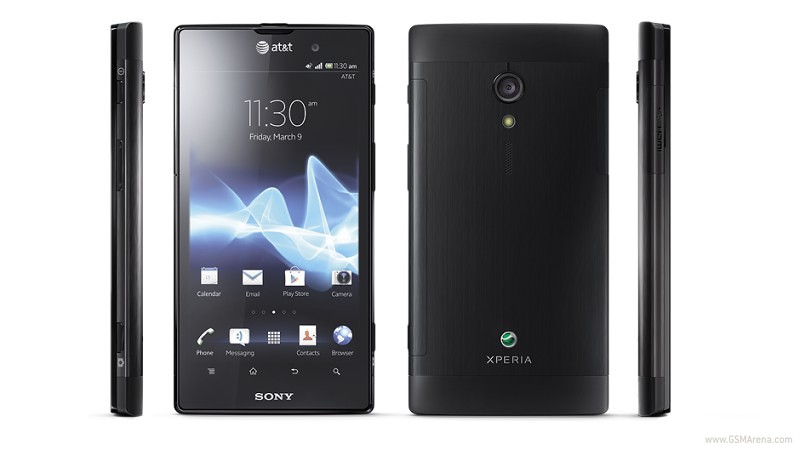
Sony was the talk of town during CES 2012 back in January and the Xperia ion for AT&T was among the main reasons why. Launched alongside the Xperia S, the Sony Xperia ion took the great honor of being the company's first LTE smartphone. To make the matters even more epic, the smartphone marked Sony Mobile's grand return to the most lucrative segment of the US smartphone market - that of the high-end, tricked out handsets with spec sheets as long as a daily newspaper. In a nutshell, the Sony Xperia ion was a big deal anyway you looked at it.
Arriving to the market six months after its announcement, the Sony Xperia ion has a different smartphone landscape to face. Samsung and HTC have already released their heavy hitters in the United States, packing better internals, and offering more up-to-date software experience. To put it mildly - arriving late to the party, the Sony Xperia ion now finds itself outgunned by the competition.
What makes this occurrence particularly frustrating is the fact that this wasn't the case at the smartphone's announcement six months ago. Back in January, the Xperia ion for AT&T could go have a go at any top-of-the-line Android smartphone on the market and emerge victorious.
To offset the massive delay, the Sony Xperia ion is priced quite aggressively. AT&T asks only $99.99 for the smartphone. Should you choose to pick one up directly from Sony though, you will only have to shell out $49.99 with a two-year contract. Cutting edge it might be not, but the Sony Xperia ion still offers you a lot of smartphone for the money. Here goes the list of its full talents.

Key features

  • Quad-band GSM /GPRS/EDGE support
  • Tri-band 3G with 21Mbps HSDPA and 5.76 Mbps HSUPA
  • Category 3 LTE network connectivity
  • 4.6" 16M-color capacitive LED-backlit LCD touchscreen of 720p resolution (720 x 1280 pixels) with Sony Mobile BRAVIA engine; Scratch-resistant glass
  • Dual-core 1.5 GHz Scorpion CPU, 1 GB RAM, Adreno 220 GPU, Qualcomm Snapdragon MSM8260 chipset
  • 12 MP autofocus camera with LED flash and geo-tagging, Multi Angle shot
  • 1080p video recording @ 30fps with continuous autofocus and stereo sound
  • 1.3 MP front-facing camera, 720p video recording
  • Wi-Fi b/g/n and DLNA
  • GPS with A-GPS
  • 16GB built-in storage; microSD card slot
  • microHDMI port, dedicated TV launcher
  • microUSB port (charging); stereo Bluetooth v2.1
  • Standard 3.5 mm audio jack
  • Stereo FM radio with RDS
  • Voice dialing
  • Adobe Flash 11 support
  • Deep Facebook integration
  • PlayStation Certified
  • Accelerometer and proximity sensor

Main disadvantages

  • Android 2.3.7 Gingerbread out of the box doesn't cut it for a high-end device this far into 2012
  • Display has sub-par side viewing angles
  • Underwhelming front touch buttons and side camera key
  • Non-user replaceable battery
As you have probably noticed above, the Sony Xperia ion for AT&T is rather closely related to the Xperia S, which came to be quite popular. In order to be more appealing to the US users however, the handset has seen its screen stretch up a bit. The microSD card slot is also a nice addition to the spec sheet - after all, the handset is made for consuming multimedia and playing videogames.
The biggest letdown about the Sony Xperia ion for AT&T is undoubtedly the lack of Android 4.0 Ice Cream Sandwich out of the box. Sony's customization of Android 2.3 Gingerbread is quite polished but still - it simply does not befit a mid-2012 high-end device. The battery life could have also been much better, given the handset's knack for multimedia.
Sony Xperia Ion Att Sony Xperia Ion Att Sony Xperia Ion Att
Sony Xperia ion live photos

Meizu MX 4-core review


The partnership with Samsung was the key to bringing a quad-core phone to the market. Meizu didn't quite beat the big names with LG, HTC and, naturally, Samsung getting there first, but it secured a precious advantage over local rivals Huawei and that should be a big win for them.

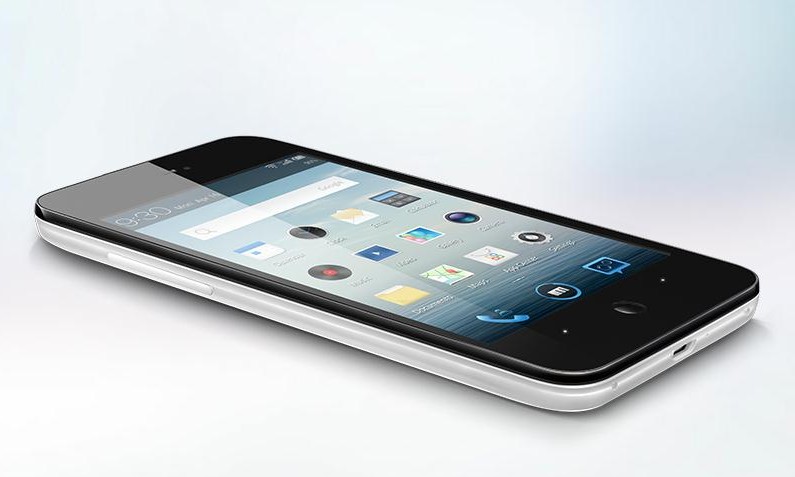
Meizu MX 4-core official photos
We're about to start exploring a phone we've already seen. The Meizu MX 4-core is virtually the same as the original dual-core Meizu MX, if you don't count the two extra cores. But who are we fooling here? We know you do. Now here's the cheat sheet to get you started.

Key features

  • Quad-band GSM and penta-band 3G support
  • 21.6 Mbps HSDPA and 5.76 Mbps HSUPA
  • 4.0" 16M-color ASV capacitive touchscreen of 640 x 960 pixel resolution; Gorilla glass
  • Heavily skinned Android OS v4.0 ("Flyme OS")
  • 1.4 GHz quad-core Cortex-A9 CPU, Mali-400MP GPU, Exynos 4212 Quad chipset, 1GB of RAM
  • 8 MP wide-angle autofocus camera with LED flash, face and smile detection; Wide Dynamic Mode
  • Up to 1080p video recording @ 30fps
  • Wi-Fi 802.11 b, g and n support; Wi-Fi hotspot
  • GPS with A-GPS connectivity; Digital compass
  • 32/64GB of internal storage
  • Accelerometer, gyroscope and proximity sensor
  • Charging MHL microUSB port with USB host, TV-out support (1080p via an optional adapter) and S/PDIF-out for dock connection
  • Standard 3.5 mm audio jack
  • Stereo Bluetooth v2.1
  • Active noise cancellation with a dedicated mic
  • VGA secondary video-call camera
  • Full Flash support
  • Document editor
  • File manager comes preinstalled
  • Impressively rich audio and video format support

Main disadvantages

  • Tries too hard to beat the iPhone at its own game
  • Sub-par viewing angles and sunlight legibility
  • Looks exactly like its predecessor
  • No dedicated camera key (but cool Gesture captuire option and volume rocker alternative)
  • Non-expandable internal storage
  • Battery not user replaceable
  • No FM radio
If you've been paying attention, you'd notice that the lists are quite similar - the original Meizu MX has been there, done that. There are only two major changes and one of them is the updated Flyme OS. The MX 4-core offers a user experience so vastly different from the established brands that Meizu may not be too worried in the end about the high-profile competition.
The other update the Meizu MX 4-core brings is the real deal, which is why it's right there in the smartphone's name. The two extra cores, the better GPU and the new 32nm architecture mean the Meizu flagship is now faster and smoother while still using roughly the same amount of power.

Samsung Jasper


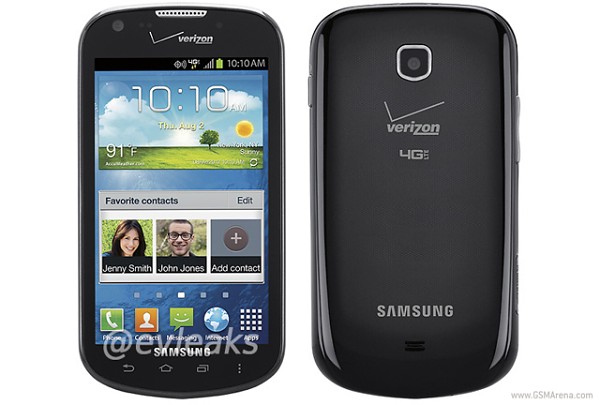
The Samsung SCH-I200, better known as Jasper, has been leaked again, and this time we get to see what the device looks like.
The upcoming device was leaked via Twitter, and will feature Android ICS out of box, alongside a dual-core Snapdragon 1.5GHz MSM8960 processor and WVGA screen. As you can see from the back panel, the smartphone will run on Verizon’s 4G LTE network and will not have an LED flash for its rear-facing camera.
Nothing is known on when or at what price Verizon plans to launch the Jasper, but as soon as some news is revealed along those fronts, we’ll let you know.

Samsung 75-Inch flagship TV boasts of gesture controlled Angry Birds Smart TV app amongst others


You know something? We humans have very basic needs, but the list of wants – now that becomes a little bit tricky. After all, the world has so much to offer, and basically anyone with enough money or power (usually both) are able to live out an extremely hedonistic lifestyle. Assuming you have been dreaming of a TV upgrade in your living room for the longest time already, and told yourself that you want to blow your budget this time around without being bothered by the financial consequences, what are some of the options at your disposal?
I would certainly tout Samsung’s latest flagship TV – we are talking about 75 inches of diagonal viewing goodness here, where the ES9000 LED Smart 3D TV is said to offer a larger-than-life, extra-premium experience alongside a timeless new design concept which will boast of a beautiful rose-gold-colored finish. All of this crammed into a form factor that is extremely slim at 0.31 inches for its curved bezel without any visible seams, and I can safely say that you’ve got a winner here.
Not only that, the Samsung ES9000 LED Smart 3D TV will also come with it, another first in the industry. We are looking at a totally new Angry Birds App for Samsung’s Smart Interaction-enabled TVs. This means you can now fling those emo avian friends using nothing but gesture controls sans the need for a controller. It might take some getting used to at first though, since most of us are so used to flinging those birds across the sky (and space) using a touchscreen display. Angry Birds is said to come as a free download later this month on the Samsung 2012 LED 7500 and up models and Plasma 8000 models. If you have more patience, a dedicated app for Angry Birds animated content will be available later in 2012 as well.
Expect the Samsung ES9000 LED Smart 3D TV to hit the general market later this August for a cool, cool price of $9,999.

Solar Transformers – If you have Sun, you have “Play Power”

I used to love building models as a kid, they were fun to make and I was proud of them when they were finished. I can’t get my kid interested in building things like that, because as she puts it “they don’t do anything” ah to be a child in the electronics age…
Well here’s an innovative solar science kit that hopefully will encourage children to exercise their often ignored creativity and imagination. This 7 in 1 kit comes with simple snap plastic parts, including solar panel and accessories  (with no screws or tools required). The kit contains easy to assemble projects that are comprised of  7 different modules, including 2 power charging stations, and 5 different vehicles.
The transforming rechargeable station has 2 output plugs; one for solar recharging and the other for battery recharging. Amazingly, the battery charging station can bring the selected unit to full power in only about 5 seconds and the solar recharging station (operational under sun or halogen lights) will fully recharge in approximately 120 seconds. The run time on these little vehicles is approximately 50-80 seconds.
The educational value is comes with the kit, The 7 in1 Solar Rechargeable Solar Transformers allows the user to experience energy that can be recharged and stored in a power source, and it lets the kids learn these principles through assembly of the vehicles.
Kids can enjoy five different vehicles: Solar Car, Concept Car, Bulldozer, Dump Truck, and Concept Race car, So with all the transforming, recharging, both indoors and out, creating, and building, kids will have something to do, with a lesson to be learned, and a toy that still “does something.” Hey, its a win-win!  Get yours for  $26.95 from owirobot.com

Friday, 20 July 2012

Spice Mi-425 review

Review: Spice Stellar Mi-425 falls a little short

 Rating: 3.5/5
 Detailed official specs for Spice Stellar Mi-425
Dimensions: 125 x 63.5 x 12.5mm
Weight: 110g
Input: Full Touch
Colour: White
Display: Screen: 10.16 cm 480 x 800 pixels
Battery: 2000 mAh
Operating frequency: GSM 900/1800, WCDMA 2100
Data networks: GPRS/EDGE/Wi-Fi/HSPA
Connectivity: GPRS/EDGE/Wi-Fi/Bluetooth/3G
SAR (W/kg): 0.357 Watt/kg
Memory Card: microSD upto 32 GB
Phone memory: 149 MB(main dissadvantage)
Camera: rear 5 megapixel autofocus with LED flash and 3.9x digital zoom and front VGA
Radio: FM
Package contents: USB cable, CD, Charger, user manual, headset, battery and warranty card


 Budget Android phones may have been selling well, but the Android experience on these low-powered devices isn't something I can recommend. The good news is that Android on a budget is now on the verge of change with the entry of power-packed sub-Rs 10,000 devices such as the Spice Stellar Mi-425.
I was eagerly waiting to get my hands on the new Stellar range of Spice phones because they promised features that we usually associate with devices priced almost double of what the Stellar phones are.
When I held the Spice Stellar Mi-425 in my hand for the first time, it didn't disappoint, even though it seemed to be on the heavier side and did feel a bit plasticy, especially to the rear.

On the first look it resembles an HTC device, in fact many friends at work thought it to be an HTC phone (though the characteristic HTC chin isn't present). The phone with a large screen is definitely good to look at. The red-coloured front and rear speakers are eye catching. Even the four backlit capacitive buttons just below the screen are appealing.
The touch is smooth and the screen bright. You may need a little shade to decipher what's on the screen in bright sunlight. I deliberately kept the phone in by bag with keys and coins for a few days and it emerged scratch free from the ordeal. The Stellar may not boast of Gorilla Glass protection, but it does not seem to be a soft target for display abrasion.
The Spice Stellar Mi-425 packs in almost everything on paper that you might want from your Android smartphones - powerful (1 GHz Qualcomm Snapdragon processor, 245 MHz GPU, 512 MB RAM and 512 MB ROM), large screened (WVGA 800x480 4 inch/10.16 cm screen), decent camera (5 megapixel auto-focus rear camera with LED flash and also a VGA secondary front camera), latest OS (Androd 2.3 and Spice says 4.0 ICS upgrade coming soon), good battery (2000mAh) and attractive price (Rs 9700 on HomeShop18). If this seems too good to be true, Spice spoils the specs party packing in a measly 140 MB of user available internal memory.
Internal memory is one of the most overlooked of smartphone features. The salesperson will try to sell you the external memory formula, but the two memories are not the same. There are a number of apps (usually the ones that you'll end up using the most) that will install only on the internal memory by default, for security reasons or otherwise. This means that you may not be able to install all the apps that you want to because of lack of storage space even if you have a 32 GB microSD card. My recommendation is a minimum of 1 GB user accessible internal memory, even 512 MB is acceptable. But 140 MB definitely isn't.
One phone that can give the Spice Stellar Mi-425 some contest in its segment is the Karbonn A9. While we are yet to get hold of a review unit, it does seems to measure up to the Spice Stellar on some crucial specifications.
On turning on the Spice Stellar you will notice that the launcher isn't the Android default, Spice has instead used Launcher+. I was actually a little tempted to change to launcher with something that suited my tastes a little better. But then that is outside the purview of this review.
A bugging habit of phone makers also finds its way into the Spice Stellar - unwanted but pre-installed apps that you cannot easily uninstall, also known as bloatware. For example a user like me has no need for an app for Live Aarti or BSE/NSE Stocks or for that matter the security app that Spice has been touting during the launch - NQ Mobile Security.
Also instead of the default Android keyboard Spice has used the TouchPal Keyboard. I experienced some issues while typing, such as adjacent letters being typed even without them being touched. Not sure if the screen calibration was to blame or the app itself. Also I was unable to get into landscape mode while trying to text. Landscape typing worked on the browser and other apps but not while texting.
That the phone is dual-SIM (GSM/CDMA, GSM) may make it more attractive to some buyers and it is always advantageous to have a second SIM slot, be it for better call rates or for something else. But the disadvantage is that dialling and texting with two SIMs inserted mean an extra barrier to cross (choosing which SIM to use).
The 5 megapixel auto-focus camera is good enough for its segment. That it comes with an LED flash is an added advantage. Only that the colours look a little washed out, but is within acceptable limits. The front camera is best used for 3G video calling or to Skype (which works pretty well on this phone). But video recording leaves a lot to be desired. The quality isn't anything that you can show off to friends, especially the ones shot in a little low light. It also seems to only record in 3GP format (the highest resolution I could manage was 864x480) and not also in MP4 as some of the listed specs suggest.
That the phone comes with powerful specs and a large screen means that there is that extra strain on the battery. Spice has tried to compensate for hunger for power by packing in a 2000mAh battery. The phone managed to give me about a day's use without charging on moderate usage. This I think should be fine for most users as we all have fallen into the routine of charging our smartphones daily.
Though the earphones that come inside the box aren't much to write about even for many of the big brands, Spice includes a good looking handsfree set with the Stellar.
The position of the USB port to the bottom right seems a little awkward to me. I prefer to have the USB port either on the top or the bottom of the phone. Having them on the sides mean that the USB cable will come in the way while trying to operate the phone when charging/transferring data.
If not for the little irritants (internal memory, video quality) the Spice Stellar Mi-425 would've been a great phone at its price. Spice did strive for a stellar device but fell a little short.
Phones from Indian companies such as Spice, Micromax and others may give great features at a budget, but they have to battle the general perception that the cheap in the price tag also extends to the quality. Many people whom I showed the phone to seemed to be very impressed with the phone until they noticed the brand. I think devices such as the Mi-425 can give the brand the value they have been striving for. While they are at it, maybe they can also get the phone's information booklet designed a little better.
Meanwhile I have my eyes on the Mi-425's 5-inch cousin - the Spice Stellar Horizon Mi-500. It promises even more bang for the buck.


(Spice Stellar with the Samsung Galaxy S III)


(Rear view)


(Innards)


(Rear camera)

WINDOWS 8 REVIEW


The Windows 8 Start screen, as it appears in the preview release.


If you’ve seen Windows 8, Microsoft’s groundbreaking new release for PCs and tablets, you’ve probably noticed it bears more than a passing resemblance to the look of Windows Phone. Here’s how the Windows 8 Start screen looks in the latest preview release.
With Windows Phone 8, the similarity is more than skin deep. We’ve based the next release of Windows Phone on the rock-solid technology core of Windows 8. It means Windows Phone and its bigger sibling will share common networking, security, media and web browser technology, and a common file system. That translates into better performance, more features, and new opportunities for app developers and hardware makers to innovate faster.
This new shared core—along with all the extra work we’ve done on top of it—opens up a new world of capabilities, which you don’t have to be a techie to appreciate. Here’s a taste:
  • Multi-core processor support: As reviewers have noted, Windows Phone runs buttery smooth on phones with a single processor. But piggybacking on the Windows core provides support for multiple cores—so we’re ready for whatever hardware makers dream up.
  • Bigger, sharper screens: Windows Phone 8 supports two new screen resolutions—1280x768 and 1280x720, opening the door to amazing new handsets with high-definition 720p displays.
  • More flexible storage: Windows Phone 8 supports removable MicroSD cards, so you can stuff your phone with extra photos, music, and whatever else is important to you, and then easily move it all onto your PC.
  • NFC wireless sharing: If you haven’t heard the term “NFC” yet, I’m betting you soon will. This emerging wireless technology lets phones share things over short distances. In Windows Phone 8, it helps make sharing photos, Office docs, and contact info easier—just tap your phone another NFC-equipped device. How cool is that?
  • Internet Explorer 10: The next version of Windows Phone comes with the same web browsing engine that’s headed for Window 8 PCs and tablets. IE10 is faster and more secure, with advanced anti-phishing features like SmartScreen Filter to block dangerous websites and malware.
  • Wallet: Windows Phone 8’s new digital Wallet feature does two great things. It can keep debit and credit cards, coupons, boarding passes, and other important info right at your fingertips. And when paired with a secure SIM from your carrier, you can also pay for things with a tap of your phone at compatible checkout counters.
  • Better maps and directions: Windows Phone 8 builds in Nokia mapping as part of the platform. Our partnership will provide more detailed maps and turn-by-turn directions in many countries, plus the ability to store maps offline on your phone so you can work with maps without a data connection.
  • Cooler apps and games: Basing Windows Phone 8 on the Windows core will unleash a new wave of amazing apps and especially games, for reasons I’ll touch on in a moment.

A new Start

We’re putting the finishing touches on Windows Phone 8 as I write this. It has a ton of great new consumer features that I can’t wait to tell you about in the months ahead. Today, however, I’m going to show off just one: the beautiful, flexible new Start screen.
The new Start sceen in Windows Phone 8 is even more flexible, with more theme colors and three sizes of Live TilesThe new Start sceen in Windows Phone 8 is even more flexible, with more theme colors and three sizes of Live Tiles.The new Start sceen in Windows Phone 8 is even more flexible, with more theme colors and three sizes of Live Tiles.The new Start sceen in Windows Phone 8 is even more flexible, with more theme colors and three sizes of Live Tiles.
The new Start sceen in Windows Phone 8 is even more flexible, with more theme colors and three sizes of Live Tiles.The new Start sceen in Windows Phone 8 is even more flexible, with more theme colors and three sizes of Live Tiles.The new Start sceen in Windows Phone 8 is even more flexible, with more theme colors and three sizes of Live Tiles.The new Start sceen in Windows Phone 8 is even more flexible, with more theme colors and three sizes of Live Tiles.
As you can see, we’re making Windows Phone 8 even more personal, with a new palette of theme colors and three sizes of Live Tiles, all of which are under your control. We know Live Tiles are one of the things current owners really love about their Windows Phones, and we wanted to make them even more flexible and unique. This short video shows the new Start screen in action.

Windows Phone…7.8!

The new Start screen is so useful and emblematic of what Windows Phone is about that we want everybody to enjoy it. So we’ll be delivering it to existing phones as a software update sometime after Window Phone 8 is released. Let me repeat: If you currently own a Windows Phone 7.5 handset, Microsoft is planning to release an update with the new Windows Phone 8 Start screen. We’re calling it “Windows Phone 7.8.”
Some of you have been wondering, “Will we also get Windows Phone 8 as an update?” The answer, unfortunately, is no.
Windows Phone 8 is a generation shift in technology, which means that it will not run on existing hardware. BUT we care deeply about our existing customers and want to keep their phones fresh, so we’re providing the new Start screen in this new update.

100,000 apps and beyond

Today we announced that the Windows Phone Marketplace officially hit 100,000 apps and games—a milestone we reached faster than Android, and a testament to the thousands of talented developers around the world who’ve supported us since launch. Together they deliver more than 200 new titles, on average, each day.
On behalf of everybody at Windows Phone, THANK YOU! We appreciate your effort and creativity and the value you bring to Windows Phone users. 
To mark the milestone, today we’re announcing a new batch of marquee titles. The official Audible app for audiobooks arrives in Marketplace today. Official apps from Chase and PayPal are in the works. Gameloft has Windows Phone versions of Asphalt 7: Heat and N.O.V.A. 3 Near Orbit Vanguard Alliance on the way.
And Nokia is helping deliver the much-requested Zynga games Words with Friends and Draw Something to Windows Phone later this year. Check out Nokia Conversations today for more details about this and other new Windows Phone-related announcements today. (And don’t miss the fun new “100,000 Apps and Counting” mugs and other goodies in the official Windows Phone Gear Store!)

Developers, developers, developers

Since we’re talking about apps, I want to tell developers a little bit about what they can expect in Windows Phone 8. Some of the exciting changes on the way include:
  • Native code support: Windows Phone 8 has full C and C++ support, making it easier to write apps for multiple platforms more quickly. It also means Windows Phone 8 supports popular gaming middleware such as Havok Vision Engine, Autodesk Scaleform, Audiokinetic Wwise, and Firelight FMOD, as well as native DirectX-based game development.
  • In-app purchase: In Windows Phone 8 we make it possible for app makers to sell virtual and digital goods within their apps.
  • Integrated Internet calling: In Windows Phone 8, developers can create VoIP apps that plug into our existing calling feature so Internet calls can be answered like traditional phone calls, using the same calling interface.
  • Multitasking enhancements. Windows Phone 8 now allows location-based apps like exercise trackers or navigation aids to run in the background, so they keep working even when you’re doing other things on your phone.
This is just a taste. Later this summer, we’ll have much more for developers on the Windows Phone 8 Software Development Kit (SDK) and the new Visual Studio 11-based development tools. So stay tuned.

Windows Phone 8 @ work

In Windows Phone 8, we’re also moving into the workplace in a big way, introducing a number of features and capabilities that companies and their IT departments demand. This is just one more benefit of sharing a common core with Windows 8. Some of the new business-friendly features include:
  • Device encryption: To help keep everything from documents to passwords safe, Windows Phone 8 includes built-in technology to encrypt the entire device, including the operating system and data files.
  • Better security: Windows Phone 8 supports the United Extensible Firmware Interface (UEFI) secure boot protocol and features improved app “sandboxing,” so the phone is better protected from malware with multiple layers of security.
  • Remote management: With Windows Phone 8, IT departments can manage apps and phones remotely, with tools similar to ones they now employ for Windows PCs.
  • Company Hub and apps: Companies can create their own Windows Phone 8 Hub for custom employee apps and other critical business info.
An example of how a new company Hub might look in Windows Phone 8.

HTC Desire C review


Are you a seasoned Android user looking for ICS on a budget or a learner ready for that big step into smartphones? Is it the journey or the destination? HTC will be pleased to welcome you on board either way. And they're making sure you start on the right foot.
Meet the Desire C. The little one at the feet of giants. The adopted child of the blue-bloods in the One family. The HTC Desire C is about half the size of a One X and has only a fraction of its processing power but the C in the name doesn't only signify compact, it also stands for comfort and capability.
HTC Desire C HTC Desire C HTC Desire C HTC Desire C

The Taiwanese have a solid record in the entry-level smartphone segment. To be fair, their pricing is not the most competitive but the build, fit and finish of their smartphones are hard to beat. Beauty anyway is in the eye of the beholder, so here are the solid facts about the Desire C.

Key features

  • Light and compact
  • Quad-band GSM and dual-band 3G support
  • 14.4 Mbps HSDPA, 5.76 Mbps HSUPA support
  • 3.5" 16M-color TFT capacitive touchscreen of HVGA resolution (320 x 480)
  • 600MHz single-core Qualcomm Snapdragon S1 MSM7227A chipset, Cortex A5 CPU, 512MB RAM, Adreno 200 GPU
  • Android 4.0 (Ice Cream Sandwich) with HTC Sense 4 UI
  • Wi-Fi 802.11 b/g/n with hotspot functionality
  • GPS with A-GPS connectivity
  • 5 MP camera, geotagging, face detection
  • VGA video @ 24fps
  • microUSB port (charging) and stereo Bluetooth v3.0
  • microSD slot (up to 32GB)
  • Standard 3.5 mm audio jack
  • Accelerometer, proximity sensor
  • Polaris Office doc viewer / editor
  • 25GB of free Dropbox
  • Stereo FM radio with RDS
  • Smart dialing
  • DivX/XviD video support
  • HTCSense.com integration
  • Adobe Flash support
  • Surprisingly good audio output

Main disadvantages

  • Feeble CPU
  • Modest retail package
  • Fixed-focus camera
  • No front-facing camera


Samsung Galaxy Ace 2 review


 A midrange smartphone has been making its way to a number of markets without much fanfare. But you can bet the Samsung Galaxy Ace 2 won't settle for the role of just another sequel. It has a chance to prove the Galaxy S III is not the only superhot smartphone Samsung has released this season.

Samsung Galaxy Ace 2 I8160 official photo
And it's going to use it. Aiming to deliver 90% of the benefits of its extremely popular sibling for a fraction of the price, the Samsung Galaxy Ace 2 plays to the company's strengths and might turn out to be one of the unsung heroes of the year.
Dual-core might not be top-dog material in the Android realm any more, but it's enough to run virtually all apps and give you a nice smooth sailing around the interface. The entrance of ST-Ericsson in the smartphone race has enabled Android OEMs to make sub-€250 smartphones, with specs that would be considered high-end on any other platform. Now who would say no to a bargain like that?

Key features

  • Quad-band GSM /GPRS/EDGE support
  • 3G with 14.4 Mbps HSDPA and 5.76 Mbps HSUPA
  • 3.8" 16M-color capacitive LED-backlit PLS TFT touchscreen of WVGA resolution (480 x 800 pixels), Scratch-resistant glass
  • Android OS v2.3.7 Gingerbread, planned Android 4.0 ICS update
  • Dual-core 800 MHz Cortex-A9 CPU, 768MB RAM, Mali-400 GPU, NovaThor U8500 chipset
  • 5 MP autofocus camera with LED flash and geotagging, Multi Angle shot
  • 720p video recording @ 30fps
  • VGA front-facing camera
  • Wi-Fi b/g/n and DLNA
  • Built-in GPS receiver with A-GPS
  • NFC connectivity
  • 4GB built-in storage expandable through the microSD card slot
  • microUSB port (charging) and stereo Bluetooth v2.1
  • Standard 3.5 mm audio jack
  • Stereo FM radio with RDS
  • Voice dialing
  • Adobe Flash 11 support
  • Accelerometer and proximity sensor

Main disadvantages

  • No Android 4.0 Ice Cream Sandwich out of the box
  • All plastic construction
  • NovaThor U8500 is the least powerful of the dual-core offerings on the market
  • No screen and capacitive key haptics

Monday, 16 July 2012

Android now powers 51.8% of US smartphones, growth continues


Popular analyst company Nielsen has published its report on the US smartphone market in the second quarter of 2012. The quarter saw smartphone growth continue as two thirds of all new customers picked a smartphone.
Android continues to be in lead, powering 51.8% of all US smartphones and 54.6% of the ones purchased over the past three months. And that was the quarter before the Samsung Galaxy S III was launched.


iOS is the other platform on the rise, with Apple's OS accounting for 34.3% of US smartphones and 36.3% of the newly acquired ones. Expectedly iOS is starting to lose pace in the third quarter of iPhone 4S availability, but things are bound to change once the iPhone 5 comes out.
BlackBerry is the only other platform on record by Nielsen and it continues its free fall. While the RIM OS still powers a respectable 8.1% of US smartphones, it only managed a market share of 4% with new subscribers. This means that it might soon join the dreaded "others" category, officially turning the US smartphone market into a two-horse race.


As for the platform that is hoping to escape that category - Windows Phone - only managed a market share of 1.3%. The Nokia Lumia lineup is still struggling to make an impact, covering just 0.3% of the market, despite the heavy promotion of the Lumia 900 by both the Finns and AT&T.

Friday, 13 July 2012

Philips AirFryer review


When it comes to the kitchen you’ve probably already got too many gadgets as it is, so should you be getting the Philips AirFryer? We’ve lived with one for just under a month to find out.Forgetting all the marketing hype, the Philips AirFryer is basically a convection oven for your counter. The unit consists of a large egg-shaped device that has a pull out tray for your food. The tray-come-basket is enough to provide a portion of chips for around three people at once and the good news is that the basket dismantles and is fully dishwasher friendly.


Above the tray is a heating element like you’ll find in your electric oven and above that a big fan (which is hidden from sight) that blows air onto the heating element and therefore the food below.Turn on the AirFryer to your chosen temperature (up to 200 degrees), set the timer (up to 30 minutes) and you’re cooking.
Because of the way the system works, it’s not only faster cooking chips in the AirFryer than an oven, but it also produces crispier results because of the way the heat is forced into the cooking chamber.That speed in real terms is about 15 minutes (slightly longer for fatter chips) beating an oven alternative by about 15 minutes.
So what can you cook? Well chips mainly, although the accompanying cookbook suggests everything from brownies to quiche.
Over the course of the month we cooked chips, chips, chips, and more chips. We did cook other things - sausage rolls with crispy tops and soft centres, bananas (they didn’t really work), and cookies (not moist enough), roast potatoes (good), stuffing (crispy on top), parsnips (very yummy), and even mushrooms in garlic butter (maybe not), but over and over again found ourselves reverting back to chips, fries and crisps.
On the chip front, the AirFryer is very good, although a “chip fan” and ex-chef we know told us they didn’t match up to a decent chip that had been deep fried (we would have to agree). Of course the AirFryer version uses considerably less and is safer as there is no large vat of boiling fat to contend with.


NuForm from Talwalkars - the nu way to total fitness. Just 20 minutes . Once a week.


The NuForm fitness studios allow full body exercise workouts using the EMS or Electric Muscle Stimulation method.
EMS is a full body training with electrical stimulation. In this method the muscles are stimulated so that the workout is much more efficient. Thus the training which one does is much more intense and faster than conventional weight training. Strengthening, toning and a super-effective workout in a short time span are the main outcomes of an EMS workout.
The training intensifies the human body's natural process wherein the central nervous system constantly sends electrical impulses to control muscle action and thus reaching deeper muscle layers which are hard to activate through conventional training. The wide range of benefits from EMS training are weight loss and fat removal, strength and endurance, relief from backache, improved blood circulation, enhanced muscle formation and stimulation, improved mobility, muscular imbalance correction and body toning. It also helps athletes who desire a strong, athletic build for themselves in terms of sports training.
The fitness training available at NuForm studios is an "active exercise" EMS method that gives the user the desired effect without a very strenuous effort. Regular intensive training with EMS helps to reduce excess body fat, gain muscle and positively influence body's metabolism. EMS training simultaneously trains all large muscle groups with high intensity at the same time. This strengthens the core muscles and also helps build muscle mass, along with taking care of body tone. What it offers is that much-desired sculpted look, with unbelievable ease!
Benefits of using NuForm studio facilities would include:
Weight Loss
Muscular Strength and Endurance
Enhanced Flexibility
Back Pain Relief
Prior to the commercial introduction of these special studios - Talwalkars has tested the technology extensively in some of the existing gyms. The experience and success of some of the members who have undergone this EMS training talks for itself. Read more what they have to say at: http://www.talwalkars.net/nuform/Testimonials.aspx


Sunday, 8 July 2012

Apple iOS 6 vs Android 4.1 Jelly Bean


Introduction


Within just weeks of each other, Apple and Google both showed off the latest and greatest they have to offer with their mobile operating systems - and both are due out later this year.
First Apple took to the stage to give a preview of iOS 6 for iPhoneiPad and iPod touch, showing off a significant upgrade to Siri, an all-new Maps app that does away with mapping from Google in favour of its own images and deeper social networking integration.
Just a couple of weeks later, Google returned fire at its I/O conference, giving Android 4.1 Jelly Bean its debut, with a refined design, Google Now and a whole host of new features.Both operating systems are available to developers now, but while iOS 6 will not be out to the public until the autumn (presumably alongside a new iPhone and maybe even an iPad mini), Android Jelly Bean will arrive on the Nexus 7 tablet in July.
Android Jelly Bean and IOS 6 are not yet finished products and may well change before they are released to the public, so this comparison is based purely on what we have seen of each operating system so far.

iOS 6 vs Android 4.1: Siri and Google Now


                                                                        Apple's 'humble personal assistant' Siri is getting a major update with iOS 6 that adds the ability to read sports results, make a restaurant reservation and books cinema tickets.
Siri in iOS 6 can also launch applications - something we always thought it should have done before - and our request to "take a photo" now works, having previously suggested, rather unhelpfully, that it is not a photographer.


Apple has partnered with a number of companies to provide these results, with Rotten Tomatoes providing film reviews and news, while OpenTable will serve up restaurant information and reviews.
You can also use Siri in iOS 6 to update your Facebook status and tweet, further integrating the two social networks into Apple's mobile operating system.
Siri in iOS 6 understands requests for sports fixtures and results across baseball, basketball, American football, soccer and hockey, and can also show stats on individual teams and players, as well as live scores from current games.
While Siri is passive, in that you have to ask if for information, Google Now takes the game a step further and becomes more alive, actively presenting you with on-screen cards that it thinks are relevant to your interests, combined with the time of day, date, location and your search history.


So while walking through central London, for example, you'll be given the local weather, transport information for buses and the Underground, and suggestions of local places to eat, alongside reviews.
An important difference between the two voice-activated systems is that Google Now can operate offline, without an internet connection.
Obviously, Google Now cannot find information to help answer your questions, but it can perform all other tasks offline, whereas Siri has to contact Apple's servers, even if all it wants to do is set up a reminder or answer you with a joke.

Verdict:
Picking a winner here is tough, because while Google Now promises to offer more, early reviews of Jelly Bean suggest that it is still a work-in-progress. Siri has a nine-month head start on its Google rival, so naturally it's going to feel like the more completed product - for now, at least.

iOS 6 vs Android 4.1: Maps


                                                          Mere days after Google showed off its new 3D maps and offline mode, Apple took its turn in the mapping game and revealed an all-new Maps application for iOS, ditching long-term partner Google in favour of TomTom.
Maps for iOS 6 features 3D buildings and landscape, but while hills and valleys are recreated everywhere, 3D buildings are currently only available in a select few cities.


Of course, this is a very early beta and we'd imagine that Apple will have a lot more to offer when iOS 6 is released to the public around October.
From what we've seen so far, 3D buildings look good, in that they are all recognisable, and navigating around is fun, but they definitely lack the clarity and sharpness of Google's offering.
Along with 3D images, Apple has added turn-by-turn directions to Maps for iOS 6. Previously, Apple offered directions with help from Google, but we never considered this as a rival to proper Sat-Nav apps, such as those from TomTom and Co-Pilot.
Now though, turn-by-turn directions work just like any other sat nav unit, but the loss of Google Streetview is certainly a step backwards for Apple until it can come up with its own solution.
An advantage for Android 4.1 Jelly Bean is its ability to show maps offline, so you don't need to worry about your driving directions disappearing if you enter an area with no mobile coverage, and you can view maps abroad without incurring vast data charges.


Taking maps offline is as easy as drawing a box around the town, city or country you want and downloading it to your phone. According to Wired, the entire city of San Francisco took up just 1.5mb of phone storage space, so you needn't worry about clogging your device up with maps.
Verdict
Ditching Google Maps was a brave move by Apple, and has resulted in the loss of Streetview. The maps in iOS 6 also seem less detailed, and while impressive initially, Apple's 3D maps are limited to around 40 cities for now and lack the detail we were hoping for - at least at this beta stage.

iOS 6 vs Android 4.1: Notifications


                                                                   Both operating systems have made improvements to their notification systems, but the majority of these updates are small cosmetic changes. Of note, Google has added extra information to each notification, which can be shown by dragging down with two fingers - this, for example, shows previews of messages in your inbox, instead of just who the message is from.


Jelly Bean's notification window also lets you control apps without going to them, so images that appear as notifications can be shared right away.
Google+ integration means that any image shared with your account can be seen full screen in the notifications drawer, but this isn't possible for Facebook and Twitter, which is a shame given the popularity of these services over Google's own social network.


Over in iOS 6, Apple has added shortcuts to tweet and update your Facebook status within the drop-down Notification Center windows, further adding to the OS's social network integration.
Verdict
iOS was a little slow off the mark with how it handles notifications, and could be accused of copying Android when it finally added the pull-down drawer with iOS 5, but the addition of Twitter and Facebook shortcuts along with pushing alerts to the lock screen is enough for iOS 6 to claim victory.

iOS 6 vs Android 4.1: Social Networking


                                                                        With iOS 6, Apple has added deep Facebook integration to sit alongside Twitter; this means that images, links and more can be easily shared on the two social networks without launching the individual applications.
Integration with Facebook and Twitter extends to your contacts, which can be synced with accounts to include their profile picture, birthday and a link to message them via Facebook in your address book.


Apple has revamped the sharing menu in iOS 6, where before a list of 'Add to Home Screen', Mail, Tweet and Print appeared when you wanted to share a link, now you're greeted with a screen of icons for Facebook and Twitter sharing, wireless printing, add to reading list and more.
This all means you can share a website link on Facebook and Twitter from within Safari, and add your location to that too if you so wish.
With Android 4.1 Jelly Bean, Google has upped the ante even further, by releasing APIs allowing developers to have direct sharing access to applications like Gallery.


What this means, is that images can be shared from within Jelly Bean to Facebook, Twitter, Google+, GroupMe, Dropbox, Foursquare and more, whereas in iOS you have to visit each application separately to share an image.
 Verdict
Adding deep Facebook integration to iOS is a good move by Apple, but Google's openness with Jelly Bean and its ability to interact with a wide range of social networks gives this point to Android.

iOs 6 vs Android 4.1: User Interface


                                                                  While iOS has remained largely unchanged since its first incarnation - save for the addition of proper notifications management in iOS 5 - Android has seen gradual change throughout its life to help simplify the UI.
For Jelly Bean, Google has introduced a number of features under what it calls Project Butter to help make the user interface smoother, faster and more responsive.

This has been done by maintaining a 60 frames per second screen rate across the whole operating system, as well as allowing the CPU, GPU and display to all operate separately, meaning that they don't have to wait for each other.
Also, the processor now ramps up to full speed as soon as you touch the screen, rather than when an app is launched, to help maintain a speedy feel throughout.
Apple has made very few changes to the iOS home screen since the iPhone was first revealed five years ago, with little more than changeable wallpapers, a new dock design and a few new applications.


Android, on the other hand, has made changes with every update, and with 4.1 Jelly Bean Google has taken Ice Cream Sandwich and refined it even further to produce a clean and elegant user interface.
Verdict
Choosing one interface over the other is tough, as it is mainly down to personal preference. But what we can say is that Android has become much more user-friendly in recent updates, while iOS has remained almost unchanged, save for a few small alterations.
Back in 2007 iOS seemed like the perfect mobile operating system, but after five years of little change, we want to see something bold and new from Apple that will take iOS into a new generation.
From what we've seen so far, this point goes to Jelly Bean.

iOs 6 vs Android 4.1: Release Date

                                                             Android 4.1 Jelly bean will be available first on the Nexus 7 tablet, which is due to go on sale in the middle of July.while the Nexus S, Galaxy Nexus and Motorola Xoom will also get the upgrade at that time.
Apple has stated that iOS 6 will be available to the public in the autumn, so we're expecting to see it around October or November.